
At least it was for me, so I hope it works for you as well.
I am not the author of this workaround, mind you. MSFS forum user BernardBx posted it on the official forums. Another member got good results. I saw his post about it and gave it a shot. My loading times reduced from around 14 or so minutes to about 3. A major win.
It all comes down to syncing the Windows time. For real. I suspect it has to do with encryption certificates, access tokens, or something similar, but that’s not important. The important thing is that it seems to work. At least for some of us.
I am using Windows 11 but if I recall correctly, the process is the same or very similar. Here’s what you need to do.
You’ll find the Windows clock in the taskbar on the bottom right corner of your monitor. Right-click it and select ‘Adjust date and time’.

A window will open.
Search for ‘Additional settings’ and you should have a section called ‘Sync now’ with a button saying the same (‘Sync now’). Click on it.
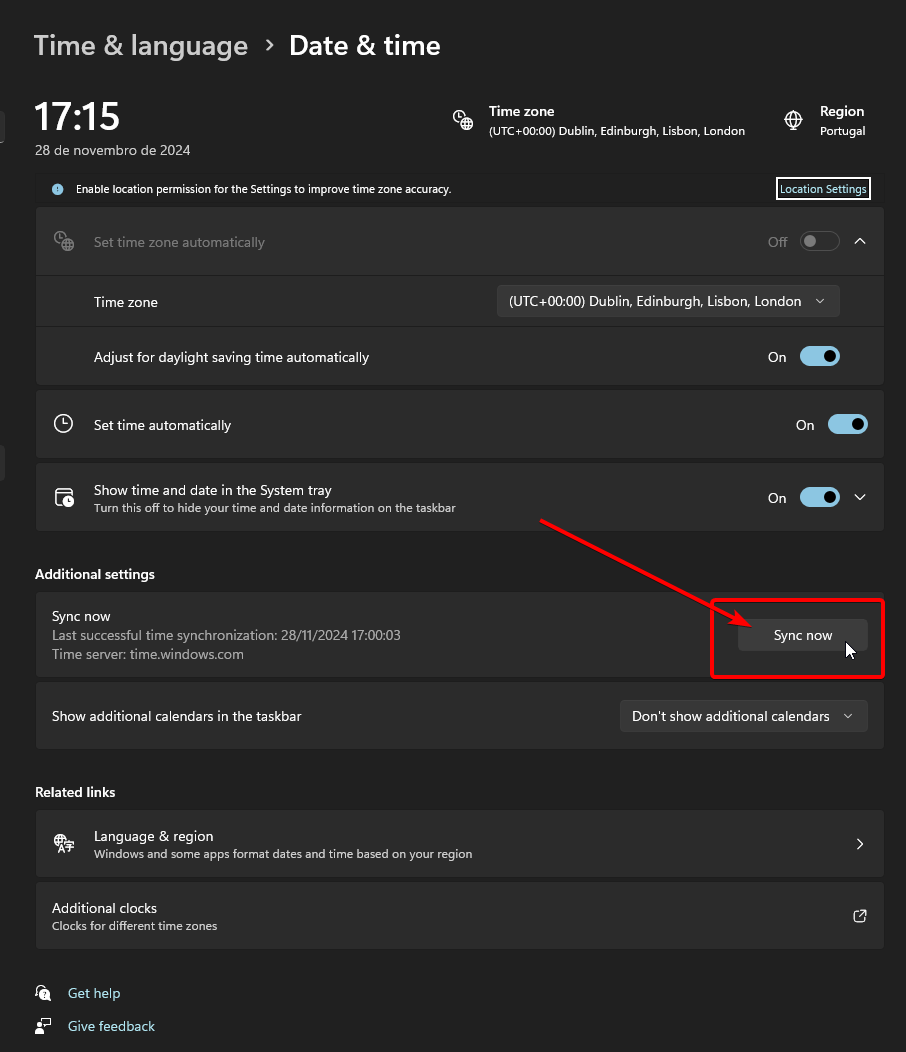
Start MSFS 2024 and see if it makes a difference. Hopefully, it did!
As I said, my loading times have been reduced dramatically, so chances are it will fix the issue for you as well. Microsoft has stated that there is a fix coming out that should remove this issue, but it’s great that we can apply a workaround already.